Making My Netbook Sing. And Dance. And Play Movies.

I’m sure I mentioned before that I really like gadgets and a few months back I bought an eeePC 1000HA for under $400. This is one of the very first Netbooks to have the Atom processor and a 160GB hard drive instead of the paltry 4GB flash drives in the early models.

I really wasn’t impressed with the device out of the box since it comes shipped with a stripped down version of Windows XP for the operating system. My initial experience with it was pretty lousy since the OS crashed hard when I tried to rearrange items on the desktop the first time I powered it up. A few more times of use were met with similar frustrations and overall sluggish response from the interface that even the addition of another 1GB of memory couldn’t help.

So, what’s a geek to do? Strip off Windows and install Linux of course! Continue reading “Making My Netbook Sing. And Dance. And Play Movies.”

The PlayOn Beta. Bridging Internet Video To My TV.

About a month ago I was selected to download MediaMall‘s PlayOn Media Server and try their beta version of software that bridges content from several Internet video provider sites to a TV.  In reality it requires a few more components along with the software to make it work, such as a PC to run the PlayOn “bridging” application that runs as a service in the system tray and a PS3 (in my case), an XBOX 360 or an HP MediaSmart TV to stream the content to.  I have a primary desktop that runs 24/7 and my home network includes a CAT-5 connection to an Ethernet switch on the first floor in the living room where my PS3 lives, so this was an easy set up for me.

With PlayOn, we leverage the existing browser and UPnP functions of game consoles and networked televisions, and use the PC in the middle to bring in the content from the Web, passing it over your home network to the device.

The software is a quick and simple installation with minimal configuration needed and uses the DLNA/UPnP protocol to instantly appear on the PS3 as several media channels in the Video menu.

The PlayOn media server appearing on my PS3.

Continue reading “The PlayOn Beta. Bridging Internet Video To My TV.”

New Site Location, New Site Look, New Site Smell.

I thought I had a good thing going for the past few years by having my websites hosted by 1AND1. Unfortunately, over the past month 1AND1 has been having serious reliability issues and my sites have been inaccessible for days(!) at a time. Calls to the tech help line were anything but helpful. They only confirmed that there was a problem and could not give an estimate for when they would be back on line.

Now, I can understand an occasional glitch, especially when computers and software touch hands, but for a hosting service to have entire servers on the fritz and no information to provide the customer (me) as to what the problem is or, more importantly, when it will be rectified is unacceptable. Continue reading “New Site Location, New Site Look, New Site Smell.”

Will The Popcorn Hour NMT Replace My XBMC?

Not yet.  And after the latest debacle with the June 18th firmware, maybe not ever.  My old, original xbox softmodded to run XBMC is still more polished and faster than this little guy, despite the glowing reviews I read which led me to purchase the Popcorn Hour NMT in the first place.

As everyone knows, there is a disconnect between the PC world and the television world – especially when it comes to getting digital video and audio content into the room where the couch and the big TV are.  Many products such as the AppleTV, Xbox 360 and my own shiny PS3 as well as various media extenders try and bridge that chasm promising to play all (or most) of your media library and bring it to your living room HDTV.  Unfortunately, the two big players that are capable of making effective products, Apple and Microsoft, are hobbled by legal roadblocks and business partnerships, both internal and external, that would sour if the box they made performed too well (read: properly) and truly freed your media.

I had high hopes when I read the impressive feature list and got on the waiting list for this little box. The Popcorn Hour A-100 NMT (Networked Media Tank) is quite a capable media player especially considering its diminutive size. The fact that it doesn’t have integrated WiFi doesn’t bother me since I have Cat-5e runs from my living room and my core home network.  When I took delivery of it I did a quick un-boxing to see what I got for my $200 and took the screws off to peek inside…

Inside the Popcorn Hour. The rear connections.

Not bad. I needed to supply a hard drive for many of the included features such as the BitTorrent, Samba media shares and uPnP and FTP services to work (for obvious reasons).  I am more interested in its file playback and streaming capabilities, but what the heck…

Now filled with a hard drive.

So, I tossed in an inexpensive 320GB PATA drive that was on sale at Fry’s and fired it up. Continue reading “Will The Popcorn Hour NMT Replace My XBMC?”

How I spent the Christmas Holiday – Modding My PS3

One of the cool features of the PS3 is that it is a serious computing device and Sony provided the option to easily upgrade its hard drive as well as install an alternate OS. So I did both.

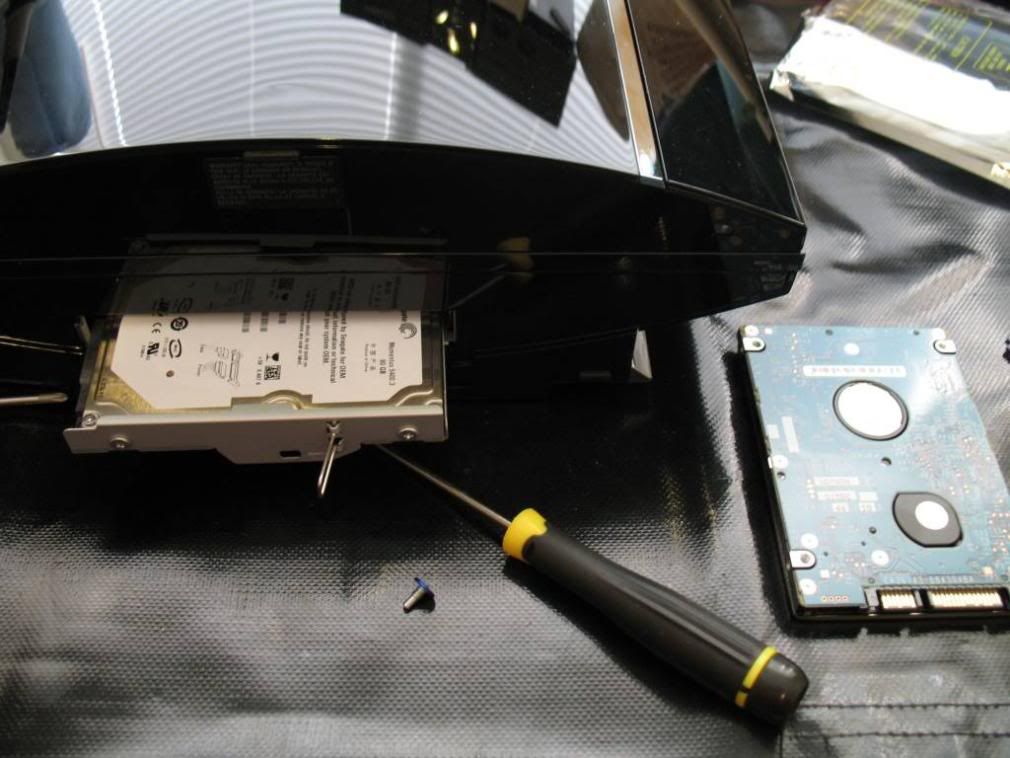
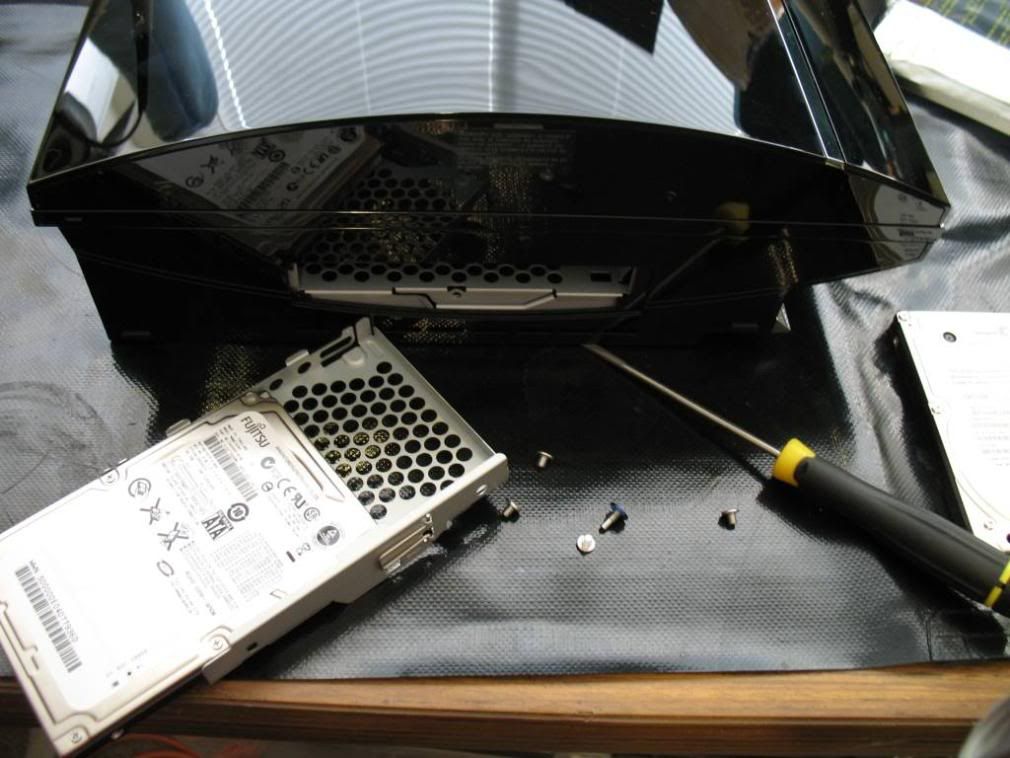
By far, the easiest HDD upgrade known to man (presently). Simply remove a panel and a screw. Slide out the old HDD and slide in the new one.

Pulling out the old 80GB HDD. Installing the new 160GB HDD on the tray.

The Sony PS3 HDD uses a SATA 5400RPM drive and it is recommended that you get one that runs at the same speed. Replacing the old HDD is trivial and all you need is a small flat-head screwdriver to pry open the side plastic panel to expose the HDD tray and a #0 Phillip-head driver to remove the retaining screw and the four HDD screws holding it to the tray. Once you have the blue retaining screw out you simply slide the tray forward to un-seat the drive and slide it out, doing the reverse to install the new one. Continue reading “How I spent the Christmas Holiday – Modding My PS3”

The best $600 router project for my $60.

I have heard of this custom, free firmware called DD-WRT for a while now, but I needed to purchase a compatible router that would accept the replacement software and the one that was recommended the most by others was the Linksys WRT54GL. It also was one of the most trivial to perform the upgrade.

The WRT54GL

Right out of the box the stock WRT54GL is a decent router so I ran it briefly to see what features it had and I felt there were just enough to make it worthwhile, but why settle for OK when I could install DD-WRT and wind up with so many additional features? The answer, of course, is ‘I won’t settle for OK’. Continue reading “The best $600 router project for my $60.”

Updated News and Weather Sets for KHBS

The existing news and weather sets at KHBS were in a small set adjacent to the newsroom, called studio ‘A’ and overdue for an updated look and layout since they had been in use for over 10 years. The new sets were built in the ‘studio next door’, studio ‘B’. Most of that studio was vacant or used for idle storage and held one old set piece that had last been used as an “election center” set year past.

The old election set.

The core of the main news set was obtained from the old WLWT facility in Cincinnati because that station had recently moved to a new location and the set was not reused by them after they moved. We sent an engineer up there with a moving truck to haul it back down in pieces, which we reassembled, modified and repainted. The working weather set was crafted from an existing, but no longer used ‘election set’ that already existed in studio ‘B’. I don’t remember who said it first, but someone described the color scheme as being the same as the Burger King Kids Club! Continue reading “Updated News and Weather Sets for KHBS”